PDF Reader - Annotate Docs
The Galaxy InfoPersonalization
2.928.00 Reviews
- Version
- 1.0
- Installs
- 100.00K
- Age Rating
- Everyone
Screenshots
Our Review of PDF Reader - Annotate Docs
 Analysis by Appyee
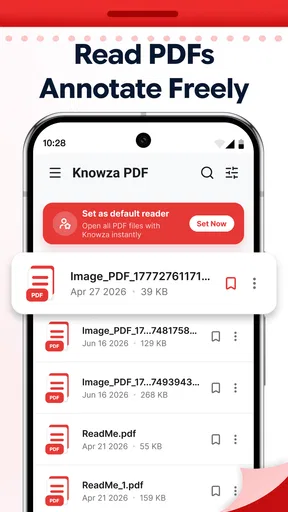
PDF Reader - Annotate Docs is the kind of personalization app I would install when I need more than a quick glance at a document. Its purpose is practical: it brings reading, annotation, editing, and PDF organization into one mobile workspace rather than making me jump between a viewer and several separate tools. After using it, my first impression is that its appeal comes from reducing small bits of friction. I can open a document, read it, mark an important passage, and keep working from the same place.
That convenience matters most on a phone or tablet, where switching between apps can make a simple task feel unnecessarily slow. The app is free, aimed at Everyone, and comes from The Galaxy Info. It is listed as a Personalization app, although its day-to-day use feels closer to a lightweight document utility. That unusual placement is worth keeping in mind: this is not primarily a creative customization tool, but something that can shape how I handle documents on a mobile device.
My main question is not whether it can be useful for one afternoon, but whether it deserves a permanent place on my device. The answer depends on how often I read PDFs and how demanding my editing needs are. For occasional reading and basic markup, it has a sensible role. For intensive document production, collaboration, or advanced file management, I would want a more established specialist tool.
What makes the first week appealing
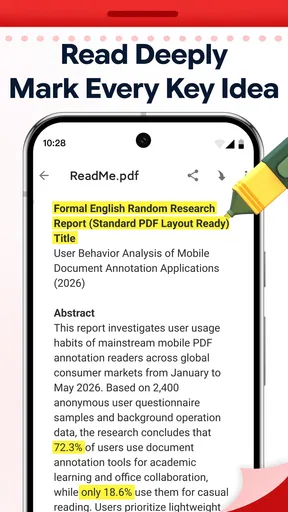
The first-week experience is easy to understand because the central workflow is familiar. I open a PDF, read through it, and use annotation tools when I want to underline, highlight, or add a note. The value is not in learning an elaborate system; it is in having common document actions gathered together. Someone reviewing a school handout, checking a work document, or studying a manual can start with a clear purpose instead of spending time configuring a complicated workspace.
I especially like the idea of using it as a temporary reading desk. If I receive a document while traveling, I can read it on the phone and mark the pages that need attention. Later, those marks give me a useful trail through the file. That is more practical than relying on memory, taking separate screenshots, or writing page references in another app.
A realistic everyday example would be preparing for a meeting from a PDF agenda. I would read the document during a commute, highlight the items I need to discuss, and add short notes beside questions. When the meeting begins, the document becomes a compact reminder rather than a file I have to reread from the beginning. The workflow is simple, but that simplicity is exactly why it can become useful quickly.
The app also suits people who prefer keeping documents local to their immediate task rather than building a large, elaborate knowledge system. I can treat one PDF as a working object: read it, mark it, make the necessary changes, and manage it afterward. That is a different experience from a cloud-first notes platform, where documents may become mixed with notebooks, tasks, and shared folders.
There is a learning advantage here. A reader who already understands PDFs does not need to rethink the format just because the app is new. The familiar document page remains the center of attention. In my experience, that makes the first few sessions feel productive, particularly when the goal is to finish a document instead of exploring every possible setting.
The free price also lowers the barrier to trying it. I can test whether its reading and annotation approach fits my habits without treating the installation as a major commitment. Its Everyone content rating makes it suitable for a broad audience, including households where the same device may be used for school, personal paperwork, and general reading.
Still, a quick first impression can be misleading. PDF tools often feel impressive when the task is straightforward, then reveal their limits when a file contains unusual layouts, many pages, forms, or complex editing requirements. I would not judge this app only by how smoothly it handles a simple document. The more useful test is whether it remains comfortable after the novelty of trying a new reader disappears.
Where it fits beside familiar alternatives
Compared with a basic built-in viewer, this app makes more sense when I want to interact with a document rather than merely display it. A default viewer may be enough for opening a receipt or checking a single page, but a dedicated reader becomes more valuable when I need a repeatable habit of marking and managing files.
Compared with a full office suite, PDF Reader - Annotate Docs appears more focused. An office suite is usually the better choice when I need to create long documents, work with spreadsheets, or move between several file formats. This app is more appealing when the PDF is already the main object and I want a direct reading-and-markup workflow without the weight of a broader productivity package.
It also differs from a note-taking app. Notes are excellent for collecting ideas, but they can separate my comments from the original page. Annotating the PDF keeps the context visible. That is useful for contracts, lesson material, instructions, and reference documents where the exact sentence or diagram matters.
On the other hand, a cloud-based document system may be better for teams that need shared comments, synchronized work across devices, or a formal review process. I would choose this app for personal handling first, not assume it replaces a collaborative document platform.
What remains valuable after the first month
The lasting value comes from repetition. A PDF reader earns space when it helps with the same small tasks again and again: checking documents, marking reading material, preparing references, and keeping edits close to the source. If I regularly receive PDFs, the ability to use one consistent workflow is more valuable than a flashy first session.
One useful habit is to annotate with a purpose rather than marking everything. I would reserve highlights for information I need to find again, use short notes for questions or actions, and edit only when the change improves the document itself. This keeps the file readable later. The app becomes more useful when my annotation style is disciplined, because the document remains a working reference instead of turning into a wall of color and scattered thoughts.
Another practical workflow is a two-pass review. On the first pass, I read without stopping too often and mark only the sections that deserve attention. On the second pass, I return to those marks and add concise notes or make necessary edits. This reduces the fatigue that comes from interrupting every paragraph and gives the reader a clearer sense of progress.
For students, that approach can turn a PDF chapter into a revision guide. For a freelancer, it can help with client briefs or instructions. For a household, it can make manuals and official forms easier to revisit. These are not dramatic use cases, but they are exactly the recurring situations in which a mobile PDF app either becomes part of a routine or gets forgotten.
Its current version is 1.0, so I would view the app as an early-stage tool rather than a mature document ecosystem. That does not make it unusable. It simply affects how much responsibility I would place on it. I am comfortable using it for reading, personal annotations, and everyday document handling. I would be more cautious before making it the only place where I manage important professional files.
The app has an average rating of 3.5, which suggests a mixed rather than universally enthusiastic reception. With around eighteen ratings, I would not treat that figure as a final verdict on every device or workflow. I would use it as a reason to test the app personally, especially with the kinds of PDFs I actually handle. A reader that feels excellent for short documents may feel less comfortable with a large technical file.
The install base is over ten thousand, enough to show that the app has found an audience while still making it feel relatively small compared with major document platforms. That can be a positive for someone looking for a straightforward alternative, but it also reinforces my cautious approach to long-term dependence. I would keep copies of important originals and avoid treating any mobile reader as the sole archive for irreplaceable work.
Small workflows that improve its usefulness
I would begin by deciding what each annotation means before using it. For example, highlights can identify facts, while notes can record decisions or follow-up questions. This simple separation makes later review faster. It is a concrete advantage of working directly on the document: the mark and the source stay together.
I would also review edited files immediately after saving or finishing a session. PDFs can contain precise formatting, and a quick check helps me notice whether the result still reads correctly. This is especially important when the document includes tables, narrow margins, signatures, or pages designed for printing. The app may make editing accessible, but accessibility does not remove the need for a final visual check.
A third useful habit is to keep active documents limited. Rather than opening every PDF on my device and allowing a cluttered reading queue to grow, I would focus on the files I am currently reviewing. That makes the management side more meaningful and prevents the app from becoming another place where unfinished tasks accumulate.
These habits reveal an important trade-off. The app can simplify document work, but it cannot decide which documents matter, how annotations should be organized, or when an edited file is ready to share. Its recurring value increases when I bring a clear process to it.
Maintenance, fatigue, and the reasons I might stop using it
The maintenance burden is relatively easy to underestimate with a PDF tool. Reading is low effort, but managing documents over time requires attention. I need to know which copy is current, where an edited file belongs, and whether my annotations are still useful. If I create multiple versions without a naming or storage habit, the app can make me more active without making me more organized.
That is why I would not use annotations as a substitute for a proper archive. For important work, I would retain the original document separately and treat the annotated copy as a working version. This protects the clean source and makes it easier to start again if my notes become confusing. It is a small precaution, but it matters more than any individual reading feature.
Fatigue can also come from mobile screen size. A phone is convenient for reviewing a few pages, yet dense documents and complex layouts are easier on a tablet or computer. If I need to compare several pages at once, inspect fine print, or perform extensive edits, the compact screen may become the real limitation rather than the app itself.
I would also skip it if my priorities are advanced collaboration, deep cloud synchronization, or a complete office environment. In those cases, the usual alternative is better because it is designed around shared work and broader document production. This app is not the right choice simply because it can open a PDF; the surrounding workflow matters more.
Another possible source of fatigue is repetition without a clear payoff. If I only open a PDF once every few months, a built-in viewer may already cover my needs. Installing a separate app makes sense when annotation and management are recurring activities. Otherwise, the extra icon may not earn its place after the initial curiosity fades.
Privacy and file-handling expectations should also shape the decision. I would be careful with sensitive documents and read the app’s current permissions and policies before using it for confidential material. That is not a criticism unique to this reader; it is a sensible rule for any application that handles personal paperwork, financial records, or workplace files.
The developer, The Galaxy Info, has released this as version 1.0, and that makes future maintenance an important consideration. A useful PDF reader needs to remain comfortable as operating systems change and as users encounter more varied documents. I would watch how reliably it fits into my routine over time rather than assuming that a promising first week guarantees lasting value.
Who should keep it installed
I think it is a good match for readers who regularly receive PDFs and want a focused way to read, annotate, edit, and manage them from a mobile device. It is also suitable for people who find full office suites excessive and basic viewers too limited. The free model makes experimentation easy, and the broad age rating keeps it approachable for general personal use.
I would recommend it to a student who marks study material, a professional who reviews documents away from a desk, or anyone who wants a more active reading workflow. The strongest fit is someone who values convenience but does not need a large ecosystem around every file.
I would not recommend making it the main tool for a team-based approval process, a large archive, or demanding desktop-style editing. In those situations, a more established PDF suite or office platform may justify its additional complexity. The right comparison is not “which app has more buttons?” but “which tool matches the work I repeat most often?”
My long-term verdict
After the first-week appeal fades, PDF Reader - Annotate Docs still has a reasonable case for staying installed, but only for a specific kind of user. Its recurring value comes from a compact loop: open a PDF, read it carefully, mark what matters, make practical changes, and return to the document later. That loop is useful enough to become a habit when PDFs are part of everyday life.
I like that the app does not need to be treated as a complete productivity system to be worthwhile. It can serve as a focused reading and annotation station, which is often all I need when I am away from a computer. The best results come from pairing it with sensible file habits, restrained annotations, and a separate backup of important originals.
My reservations are equally clear. Version 1.0 and the modest rating history make me cautious about depending on it for critical document operations. Mobile editing has natural limits, and users who need collaboration or advanced document production will probably be happier elsewhere. The app also loses much of its purpose for people who rarely handle PDFs.
For me, the final judgment is positive but measured. I would keep it on a device used for regular document review, especially because the free access makes the trial low risk. I would remove it if my needs shifted toward shared work, complex editing, or a more formal archive. It earns lasting space through repeated usefulness, not novelty.
If your daily document needs are modest and personal, PDF Reader - Annotate Docs is worth trying as a focused mobile companion. If your PDFs are central to a larger professional system, choose a tool built for that system instead. That distinction is what makes this app easy to recommend to the right friend, while keeping the recommendation honest.
Privacy and Permissions
See what permissions an app requests and how it handles your data.
- Location
- approximate location (network-based), precise location (GPS and network-based)
- Photos/Media/Files
- read the contents of your USB storage, modify or delete the contents of your USB storage
- Storage
- read the contents of your USB storage, modify or delete the contents of your USB storage
- Camera
- take pictures and videos
- Wi-Fi connection information
- view Wi-Fi connections
- Other
- view network connections, connect and disconnect from Wi-Fi, control flashlight, full network access, run at startup, set wallpaper, control vibration, prevent device from sleeping, Google Play license check
Verdict
Strengths of PDF Reader - Annotate Docs
- Opens large PDF files smoothly on most modern devices.
- Supports highlighting, underlining, and freehand annotations.
- Searches text quickly across lengthy documents.
- Offers useful page thumbnails for faster navigation.
- Works well for reading documents offline.
Limitations of PDF Reader - Annotate Docs
- Some advanced annotation tools may require a paid upgrade.
- Interface can feel crowded on smaller phone screens.
- Limited editing options for changing existing PDF text.
- Large scanned documents may take time to load.
- Cloud and sharing features may vary by device or account.
Similar Picks in This Category
View All
Microsoft SwiftKey AI Keyboard
SwiftKey4.3

Wallpapers
Google LLC4.1

Zedge™ Wallpapers & Ringtones
Zedge4.7

Yandex Browser with Alice AI
Direct Cursus Computer Systems Trading LLC4.3

Ringtone Maker:create ringtone
Big Bang Inc.4.7

Fonts Keyboard
Fonts Keyboard3.9
Frequently Asked Questions
What is PDF Reader - Annotate Docs used for?
PDF Reader - Annotate Docs is designed for opening, reading, organizing, and working with PDF files on a mobile device. During use, it is particularly helpful for reviewing documents, searching for specific words, navigating between pages, and adding notes or highlights. It can be useful for students, professionals, and anyone who regularly receives forms, reports, manuals, or digital documents.
Can I annotate PDF files with PDF Reader - Annotate Docs?
Yes, annotation is one of the app’s main purposes. Depending on the tools available in the installed version, you can typically highlight important passages, add text notes, draw or mark sections, and use other commenting features while reviewing a document. These options make it easier to study, proofread, or provide feedback without printing the PDF.
Does PDF Reader - Annotate Docs work offline?
The app can generally be used to read and annotate PDF files that are already stored on your device without an internet connection. Offline access is convenient when traveling or working in areas with limited connectivity. However, features involving cloud storage, online file transfers, account synchronization, advertisements, or downloading documents may require an active internet connection.
Can I open and manage PDFs from other apps?
PDF Reader - Annotate Docs is intended to work with PDF files shared from common locations such as email attachments, file managers, messaging applications, and cloud storage services. You can usually open a document through the device’s share or open-with menu, then save or organize it inside the reader. Available integration options may vary between Android and iOS.
Is PDF Reader - Annotate Docs free to download and use?
The application may be available as a free download, but some tools or conveniences can be restricted to a premium version. Before installing, check the store listing for details about subscriptions, one-time purchases, advertising, export limits, cloud features, or advanced annotation options. Also review the required permissions and privacy information if you plan to handle sensitive documents.
